
DOWNLOAD THE APP


Customer Services
Copyright © 2025 Desertcart Holdings Limited
DOWNLOAD THE APP




🚀 Elevate your home network to pro-level speed and zero lag!
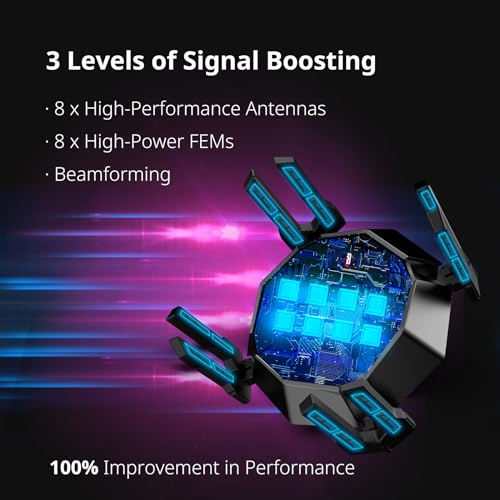
The Reyee AX6000 WiFi 6 Router delivers ultra-fast 5952 Mbps speeds with the latest Wi-Fi 6 technology, powered by a 2.0 GHz quad-core CPU. Featuring a dedicated gaming port that automatically prioritizes wired devices, eight antennas with FEMs for full-home coverage, and advanced QoS for lag-free gaming with up to 10 players simultaneously. Ideal for large homes, it supports 2.5 Gbps multi-gigabit connectivity and WPA3 security, transforming your space into a high-performance e-sports arena.


| ASIN | B0C7BG64YD |
| Batteries Included | No |
| Batteries Required | No |
| Brand | Reyee |
| Compatible Devices | Gaming Console |
| Connector Type | Ethernet, Wi-Fi |
| Customer Reviews | 4.2 4.2 out of 5 stars (443) |
| Data Transfer Rate | 6000 Megabits Per Second |
| Date First Available | 7 May 2024 |
| GSM frequencies | 160 MHz |
| Item Dimensions LxWxH | 24.9 x 24.6 x 15.5 Centimeters |
| Item Weight | 980 g |
| Item model number | RG-E6 |
| Model | RG-E6 |
| Model Name | RG-E6 |
| Number of Ports | 5 |
| Operating System | RouterOS |
| Product Dimensions | 24.89 x 24.64 x 15.49 cm; 980 g |
| Special Features | Access Point Mode, Guest Mode, QoS, WPS |
| Wireless Type | 802.11ac, 802.11ax, 802.11b, 802.11g, 802.11n |
M**Z
Exceptional Performance and Reliability! After upgrading to the Reyee AX6000 WiFi 6 Router, I’ve experienced a remarkable improvement in my home network’s performance. The router’s dual-band capabilities, offering speeds up to 1,148 Mbps on the 2.4GHz band and up to 4,804 Mbps on the 5GHz band, ensure seamless connectivity for all my devices . The dedicated gaming port is a standout feature, automatically prioritizing wired gaming devices for a fast and stable connection without the need for complex configurations . The setup was straightforward, and the user-friendly interface made it easy to customize settings to my preferences. With multiple devices connected simultaneously, including smartphones, laptops, and gaming consoles, the network remains stable and fast. The router’s robust design and eight adjustable antennas provide excellent coverage throughout my home. Overall, the Reyee AX6000 WiFi 6 Router has exceeded my expectations, delivering high-speed, reliable internet connectivity. I highly recommend it to anyone looking to enhance their home network experience.
G**S
I haven’t messed with any manual prioritization because I didn’t need to. Originally bought this because it was cheaper and I could configure it the way I wanted. It has a feature that automatically limits bandwidth to other devices when gaming. I use the gaming port and it legit works. I’ve tried others like ASUS and it never worked. Call of duty is almost lag free and I get a match 17-30 ping 9/10 times. Most important aspect is the upload speed when playing fps and I get almost 900 mb upload on it (wired gaming port). Most “gaming” routers will get you 1gb download but upload is terrible. I had put off this purchase because I’m not too familiar with Reyee but the wireless gets me 600-700 mb on AC (I don’t have any AX devices yet). Media and streaming were 4K quality on WiFi, and work pc didn’t lag. Great buy Cons: Worth noting that the claimed console booster is extra to use. There’s something about a paid subscription for software when you install it but they never ask for any payment information so I assume that’s the console booster. You cannot prioritize a device on Ethernet so you have to trust that the boost gaming mode is doing its job.
P**.
This thing works fantastic. I was having connection issues previously and it turns out the previous router did not support the number of devices I had connected. Since setting up this router all of our connection issues have disappeared. It works fantastic and was pretty easy to set up. ****IMPORTANT NOTE**** Asurion is a scam. In my experience, If you ever have to file a claim they will make the process as difficult as possible. When you sign in to the app to file a claim you have to sign in three separate times. The form they want you to fill out does not self-populate your name, address, phone # etc. You’ll then need to enter various other information, and they want a pic of both the front and back of your driver’s license (remember, you logged in with a UN and PW). Once you upload all of this, they tell you it will take 24 business hours to review. First, they reject the form stating you must print and sign the form even though it says you can sign electronically. If you call their number, they will place your call on hold for a while and initially an automated message will attempt to tie up your call having you answer various questions. Eventually someone in a foreign country will answer your call. The initial person will try to sell you additional services and after you say no a couple times, they will transfer you to someone else. You guessed it, you will have to be on hold again. You will get transferred and placed on hold several more times and they will find a way to deny your claim. What is especially frustrating is you have followed all their directions along the way. They can (and will) raise service fees without any notice. In the end, you will not save any money and have spent far too much time submitting forms and talking to people that lie and misdirect you every step of the way. The company’s employees are dishonest and have no problem lying to you. You can give it a try if you want but you have been warned. Instead of paying their monthly fee dump the money in a savings account. Odds are you’ll be able to buy a new product that’s updated, and you will receive it in a couple of days instead of weeks later.
E**E
I took a chance on the Reyee AX6000 after doing a lot of research on the company, which apparently has been in the commercial side for a while but is a more recent entrant into the consumer side. I needed to replace my Linksys MR9600 (AX6000) which had been rock solid but had started to drop connection several times a week. The Reyee comes with a cat5e ethernet cable I think, so anyone wanting to take full advantage of the 2.5G WAN port might want to get a cat6 cable. The setup instructions are pretty basic but got me online in a few minutes. I had to download a full manual and look up videos on youtube to learn how to fully setup the router. I used my laptop to access the ip address instead of using the app. The interface itself gives you a lot of control, although I chose to simplify things since I had heard the fewer things you ask the router to do, the better the chance to run smoothly. I kept my SSIDs split and used the same names as before. Powercycling my devices afterwards helped performance, especially my laptop, which at first had erratic download speeds on wifi. However, my wifi garage door opener hasn't recovered yet. My gamer son reports that this router is faster and more stable (he does Nintendo with ethernet). I can tell that the speeds are generally faster than with the Linksys and have a greater range throughout my 2500 sq. ft ranch-style house. Buried deep in the settings is the option to adjust the power of the wifi signal. Using my laptop app I was able to see that the Reyee signal was stronger by itself than that of the Linksys (which I had extended with a MESH unit). I'm pretty impressed so far, and hope it remains stable over the long haul. My biggest complaint so far is the light documentation it came with, but there are enough youtube videos and online manuals to help you configure the router if you need to really tweak it. Also, the videos might still have the 20% off coupon so look one up before you purchase.
T**I
Idk what type of technology this thing be using, but I was two blocks away from my house and still had wifi connection. Their app is actually really good and quite easy to use. They do have built in parental controls in their app but I have no idea how it works cuz I never touched upon it. The wifi speeds I got even thru the wall was very nice, I'm currently using a high wifi plan and even at 2.4Ghz, which trades speeds for better range gave my pc 100Mbps+ Download. With their app the litterally let you make separate wifis with completely different names and speeds of wifi.
Trustpilot
1 week ago
3 weeks ago