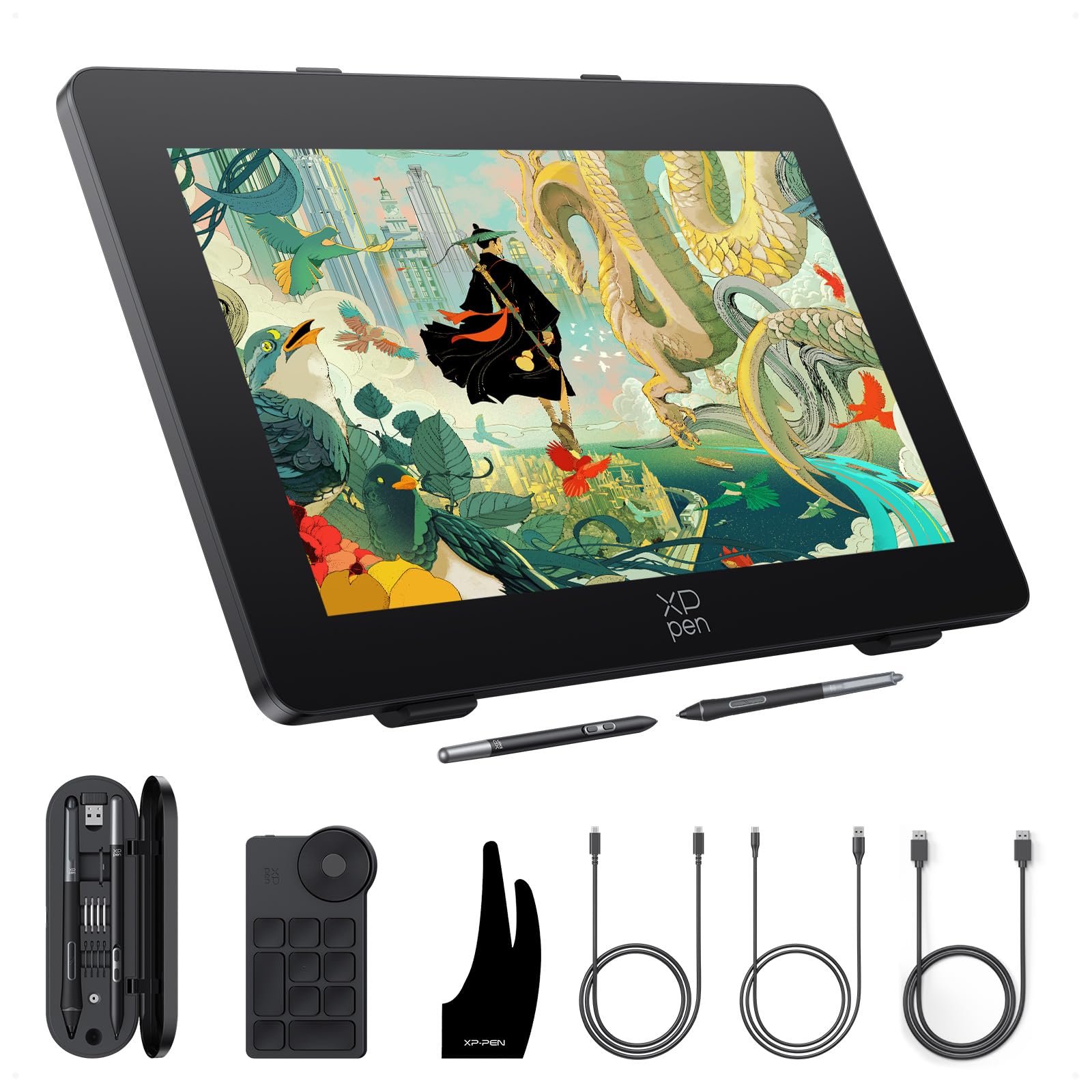
🎨 Elevate your art with speed, precision, and color perfection!
The XPPen Artist Pro 24 Gen2 is a cutting-edge 23.8" drawing tablet featuring the world's first 165Hz 2.5K QHD display for ultra-smooth visuals, professional-grade △E < 1 color accuracy, and dual battery-free styluses with 16,384 pressure levels. Designed for artists and animators, it offers a natural paper-like drawing experience with a full laminated anti-glare screen, an award-winning wireless shortcut remote, and flexible stand options. Compatible with major OS and creative software, it’s a powerhouse tool for professional digital creators seeking precision and speed.













| ASIN | B0DB8G1W5D |
| Batteries | 1 Lithium Polymer batteries required. (included) |
| Best Sellers Rank | #40 in Computer Graphics Tablets |
| Customer Reviews | 4.3 4.3 out of 5 stars (679) |
| Date First Available | July 26, 2024 |
| Item Weight | 19 pounds |
| Item model number | MD240QH-US |
| Manufacturer | XP-PEN |
| Product Dimensions | 29.1 x 19.3 x 0.1 inches |
S**H
Excellent Drawing Tablet – Smooth, Accurate, and Well Worth It
This drawing tablet has been a fantastic upgrade for my digital art setup. The display is crisp and vibrant, with excellent color accuracy and minimal parallax, which makes drawing feel very natural. The pen response is smooth and highly accurate, with great pressure sensitivity that translates well into detailed line work and shading. I really appreciate how lightweight and comfortable the pen feels, even during long drawing sessions. Setup was straightforward, and it works seamlessly with my software without lag or connection issues. The tablet itself feels solid and well-built, and the adjustable stand makes it easy to find a comfortable drawing angle. Overall, this is an excellent value for the quality you get. Whether you’re a beginner or a more experienced digital artist, this tablet delivers professional-level performance at a reasonable price. Highly recommend.
G**N
I Love This Tablet!
This is a great tablet the size is a bonus for it’s price which is super affordable and it works seamlessly with your desktop or laptop the pen has nice feel and weight to it, while the tablet is light shortcuts are easy to set up on the tablet ke
K**.
Great for the occasional drawing needs - artistry or work presentations
I order this item on a whim during a prime day sale, the price seemed too good to be true. Maybe the holiday packaging in the middle of summer threw people off. I won't turn down random value-added swag anyway! What I liked: + Narrow pencil-inspired (hexagon shaped), batteryless stylus, with eraser function + Glorious 1080P resolution screen + Scroll surface for zooming in your drawing application + Modern, quality Windows drivers + Works with Windows Ink + Top notch build quality + Freebies, like carry case, glove, and keychain + Nice, long breakout cable What I didn't like: - Cable connector doesn't *lock* into place - Gets hot with extended use - Eraser not supported in SAI 1.2 - No built-in angle stand legs My previous tablet was a Yiynova MVP10UHD+IPS (what a name), which was a 10" USB-powered digitizer screen. It worked well enough, had function buttons, and a battery powered pen. The build quality was okay, not great. This XP-PEN display tablet hands down blows it out of the water. Not only was it half the cost, it's larger, and has more functions. It was also vastly easier to configure. The drivers for windows 10 seem modern, thoughtful, and solid. Since the screen is direct from HDMI, there is no "DisplayPort" software to mess with. It is important to consider how you're going to use this Artist 12 display. It requires HDMI and a USB power adapter. If you don't have HDMI or would prefer a simpler, USB only connection, check for that in a different product. After using this one though, I don't miss the USB only style of the Yiynova. The 1920x1080 screen resolution is crystal clear and I don't seem to be missing anything color wise. The connection to the device is through a single port, and it is up and out of the way. (A left-handed user may disagree, if you rotate the display 180 degrees.) It did not take me long to get it working with PaintToolSAI, but, as advertised, the eraser function does not work in that program. (Sai is over 3 years since it was last updated, so I don't blame XP-PEN.) You can still get pen events from the eraser side and draw with it, but SAI does not understand to switch to the eraser mode. Input lag? There ain't any. The visual screen surface/digitizer surface distance appears shorter than the Yiynova too, so its less jarring if you're using to traditional drawing. Then pen itself is a thing to behold. It's not fat, clunky, or oddly shaped, like most tablet screens I've used. It's a hair over 1cm thick. It has an eraser function, 8k levels of sensitivity, and a barrel button, which is recessed ever so slightly to help cut down on accidental clicks. The pen also has a grippy quality to it, so it stays nice and firm in your hand. Another cool use of this tablet is for business presentations if you are working with remote teams. Whiteboarding is often crucial to planning and explaining things, and this tablet--right out of the box--works with windows ink and the neat features that provides (like, basically white boarding during a screen-share meeting). On a downside, it does get very hot after a while. (This is a sign for me to take a break!) 7-month update: I noticed one day, the colors presented on the screen were off. Almost like a color channel was not working correctly on the screen. I contacted XP-Pen support, and they were extremely helpful. They sent me a dongle device which delivers a firmware update, and the color issue was resolved. Still 5 stars from me!
J**N
High quality hardware, some problems with drivers
This is my second xp-pen tablet. I first purchased the artist 12 but returned it due to an intermittent problem with the connection to my PC. I was very happy with xp-pen support so I decided to stick with xp-pen and upgrade to the artist 13.3 pro. 3 months later and after being used almost every day by my 11 year old daughter I continue to be impressed by the quality. This is a significant upgrade from the artist 12. The additional controls make my daughter extremely productive in all of the programs she uses this with. The screen is tough and is still flawless. I was concerned about the screen because 11 year olds are t the most careful of people when using technology. My daughter also uses this as a second screen when she is not drawing. The documentation provides instructions that when mirroring the screen their instructions must be followed to have a good experience. I can confirm that when following their advice it works flawlessly. When not mirroring the display there are not supposed to be limitations in matching the resolution of the tablet with the primary display, but we have found that unless we match the resolution on both displays the pen often doesn’t work correctly and the onscreen response is significantly misaligned with where the pen touches the screen. My daughter is okay with having both monitors set to 1080p, but it bothers me that she has a 4K display running in 1080p when it shouldn’t be necessary. This is reproducible on 2 computers running windows 10. I suspect this is a driver issue and it is by no means a showstopper. I highly recommend this. It is fantastic for the price and is just the right size for my daughter. I was going to order a larger model but changed my mind and am glad I did. If it was for my use I would probably have bought a larger model but as my daughter uses the tablet both with the included stand and holding it a larger model would have been too large for her to hold comfortably.
A**L
Decent for beginners
Overall, the XP-Pen Artist 13.3 Pro V2 is an average drawing display. Pros: The screen is clear, pen pressure is responsive, and there’s little drawing delay. Setup isn’t too complicated, and it works fine for beginners or light users. Cons: The screen edges show slight color inconsistency, the pen feels a bit too light, and it can get tiring during long sessions. The driver sometimes glitches and requires a restart. In short, it’s a decent option for starters, but professionals might find it lacking in stability and precision.
T**S
pros: -very responsive -comes with two pens to fit your workflow -large clear screen cons: - GLARES the screen is huge and i swear I couldn't see half the screen from the glares -the bezels are tooo thick i know people will say that artists prefer these bezels to prevent accidental touches to the screen but why? the tablet doesn't have a touch its stylus compatible only and the bezels could be thiner to hold the tablet while drawing like only thumb size - this tablet is heavy like really really heavy and huge for 24inch tablet, i have a 34 inch monitor and this tablet is heavier and thicker and larger than my ultra wide monitor had to return it for it being absurdly huge not screen huge but huge in general, it doesnt have built in shortcut buttons so why bother with the huge bezels? and it's just a tablet literally a monitor with stylus support so why does it have to be this huge and bulky?
J**N
Worked great but dead pixels started appearing with less than a months casual use!
V**N
Good for drawing
S**O
Es muy cómoda, el tacto de la pluma con la pantalla es suave. Directo, fácil de usar, tal vez el cableado triple es lo único incómodo del producto pero fuera de eso es increíble y el tamaño de la pantalla es excelente, perfecto para obtener mejor detalle. Casi como si dibujaras en papel. Realmente estoy satisfecho. Tiene todo lo necesario. 👍💚
T**.
Es ist mein erstes Grafik Tablett und ich wollte schon immer mal digital zeichnen und 3D Modellieren mit Stift. Es ist so viel angenehmer und intuitiver und das Tablett leistet seinen Beitrag dazu. Pro: -) Sehr gut angeordnete shortcuts die sich gut drücken lassen. (nicht zu nahe und zu weit weg) Ausserdem haben sie spührbare Pünktchen auf den Tasten das man sogar erfühlen kann um welche Shortcuts es sich handelt. -) Ausreichende Auflösung von 1080p -) Top Preisleistung -) Schöne Farbdarstellung -) Gute Helligkeit. -) Leicht matte Oberfläche (Spiegelt nicht) -) Der Stift liegt gut in der Hand. -) Das Zubehör ist Nützlich. -) Gummierte Füßchen auf der Rückseite somit rutscht das Tablett nicht rum. Con: -) Es war schwer herauszufinden WELCHES USB-C zu USB-C Kabel man benötigt wenn man das Mitgelieferte Kabel nicht nutzen möchte. Weder auf der Webside noch in der Anleitung findet man etwas dazu. Ein Tipp für euch es wird ein UBS 3.2 für Video,Strom und Daten Übertragen benötigt.
Trustpilot
1 month ago
1 month ago



