


🚀 Power your future with the ultimate AM5 motherboard experience!
The GIGABYTE X870E AORUS PRO is a premium ATX motherboard designed for AMD Ryzen 7000-9000 series processors, featuring DDR5 memory support, PCIe 5.0 with 4 M.2 slots, WiFi 7, dual USB4 ports, and robust 16+2+2 power stages. Engineered for professionals and gamers seeking top-tier performance, connectivity, and thermal management, it offers a 5-year warranty and best-in-class build quality to future-proof your high-end PC build.





| ASIN | B0DGVGV7YN |
| Best Sellers Rank | #11 in Computer Motherboards |
| Brand | GIGABYTE |
| CPU Model | AMD Ryzen 7 |
| CPU Socket | Socket AM5 |
| Chipset Type | AMD X870E |
| Compatible Devices | Personal Computer |
| Compatible Processors | AMD Ryzen 7000 series , AMD Ryzen 8000 series, AMD Ryzen 9000 series |
| Customer Reviews | 4.2 out of 5 stars 1,018 Reviews |
| Graphics Card Interface | PCI Express |
| Main Power Connector Type | 24-Pin |
| Manufacturer | GIGABYTE |
| Memory Clock Speed | 5600 MHz |
| Memory Slots Available | 4 |
| Model Name | X870E AORUS PRO |
| Model Number | X870E AORUS PRO |
| Number of Ethernet Ports | 1 |
| Number of Ports | 13 |
| Platform | Windows 10, Windows 11 |
| Processor Socket | Socket AM5 |
| RAM Memory Technology | DDR5 |
| Ram Memory Maximum Size | 256 GB |
| Total Number of HDMI Ports | 1 |
| Total PCIe Ports | 1 |
| Total SATA Ports | 4 |
| Total Usb Ports | 9 |
| UPC | 889523045251 |
| Warranty Description | 5 Year Manufacturer |
I**R
The best X870E board on my opinion
The best X870E upper mid range motherboard. Aorus Master. I have the ROG Strix X870E-E, Had and returned the MSI X870E Carbon wifi and finally I bought this Aorus Master X870E. The Strix is good, the MSI is trash, and this Aorus is fantastic. It includes all kinds of sensors, stability is rock solid and memory frequency is optimal. The Strix only manages to reach 5600MT/s with all Dimms populated. The MSI didn't post at any frequency even at 3600 with 4 Dimms. This Gigabyte Master works at 6000MT/s without any issue (you must configure the impedances on all boards to support 4 Dimms). The board is stable, the network is solid and the build construction is best in class. Only issue I have is with the context restore config on Bios that keeps getting auto-disabled when EXPO is enabled. That makes the boot times longer than expected at about 3 minutes with a 128 GB of RAM. Using the board with a 9950X as reference. Tha PBO setting works as expected in case you are interested on using this performance option. Hope Gigabyte solves the memory context restore when a new Bios gets released and that would make the board 10/10. The Strix doesn't have that issue but it can't reach the optimal memory frequency of 6000MT/s even after a long work of tunning the impedances and timmigs. The memory performance superiority on the Gigabyte is also reported on the hardware unboxed review video reaching up to 8200MT/s with two dimms. I recommend this board above all others...
J**Y
Best motherboard I’ve ever purchased
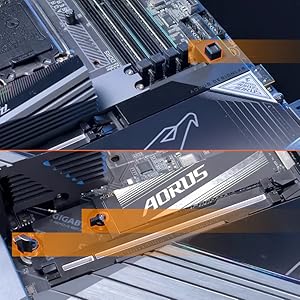
Aorus motherboards continue to impress me. I plan to shop Aorus motherboards exclusively for all my future PC builds. Aesthetically, I find the iced out white to be very pleasing, as it pairs very nicely with all the RGB lighting I have set up inside my case, providing a soft reflective glow instead of absorbing the light like a typical motherboard. The sleek appearance of all the VRMs and heat sinks also contributes to the visual appeal of this, and all Aorus boards in my opinion. I’m particularly partial to the lit Aorus name on the rear panel VRM. There are plenty of the right types of connections for my needs: PCIe 5.0 graphics and M.2 (there are four total M.2 slots, but two of these share bus lanes with the x16 graphics port), optical audio out, providing great sound quality, two USB-C ports directly on the back, and 10 USB-A ports, eight of which are 3.2. It also has two PCIe x4 slots but I don’t have a need for those, at least not yet. This board fits perfectly in my Corsair 4000D case, and the connection layout is the most sensible one I have encountered in a motherboard to date. Everything is also well-labeled, almost negating the need to look in the manual (which is only provided online, to save paper). I think my only gripe about it is that if I need to remove the video card, I need to remove the primary M.2 heatsink (directly north of the PCIe x16 slot, and quite a beefy heatsink, which is nice) because it’s next to impossible to hit the release latch otherwise. Just don’t forget to reinstall it when you finish. There is also a heatsink for the three M.2 slots just south of the x16 slot, which also requires the video card to be removed unless it doesn’t take up more than one slot I guess, but I don’t think there’d be much point to a video card that small. Gigabyte provides small foam blocks to “push” your SSDs into the thermal foam on the underside of the heatsink. I have found it works best with SSDs that do not have a preinstalled heatsink of their own, although the manual claims it works either way. I was relieved when I discovered this as I originally intended to buy one with a heatsink but accidentally ordered it without. All of these features come together to provide a complete package for unparalleled speed, reliability, and thermal performance in its price range. I use this board for gaming and I am thoroughly elated with it.
D**S
Awesome Board!
This motherboard was easy to install and fit in my Havn 420 case perfectly. The performance has been stellar in my high end gaming machine and it takes anything I throw at it so far. I would definitely purchase from this line of motherboard again. It boots quickly, had space for a second SSD drive in a slot that wouldn't bottleneck my lanes used by the GPU. This was my first build ever and it withstood my clumsiness just fine so the durability is great. Buy this motherboard for an awesome white build or to draw some attention and enjoy the built-in lighting effects!
R**R
Great motherboard. Lacking Bluetooth/WiFi adapter
This motherboard is wonderful. I have had it for a little more than 3 weeks now. I have built the computer myself so I can attest to how easy it was to install everything, and the build quality seems great. The motherboard has plenty of headers for anything you need from fans to hard drives. I have connected 3 sets of fans, and an AIO that came with fans, so that's 4 sets of fans and the AIO's pump. So far I have been able to control the RGB through the motherboard without the need for any extra hardware for the fans like a hub. To keep this short and sweet, if you are looking for a top tier motherboard this one has everything you need and looks great. I am removing 1 star because of the Bluetooth/wifi adapter used in this motherboard. While I'm getting great WiFi speeds, same as my Lenovo Legion 7 pro, the Bluetooth connection isn't great when using the mic. Let me explain. For example when playing a game, and I want to use the mic, the audio profile used by the Bluetooth wireless headphones is switched to a lower grade profile (because of the mic usage), that happens regardless of disabling open mic options, audio enhancements, etc... the audio profile doesn't switch back to the good profile when the mic isn't being actively used, which causes static and distortions while gaming. I have tried two wireless headphones, one being the Bose QC Ultra 2 (top of the line headphone) and same issue happens on both. My research concluded that the Bluetooth adapter when combined with Windows 10 and 11 will have issues when the mic becomes active. I haven't tested this on Zoom meetings, but I suspect it wouldn't be a major issue there, since the audio isn't going to be demanding there, but for gaming it becomes absolutely annoying to use. This didn't happen on my Legion laptop. So, now I am stuck with the following options. 1- Replace the Qualcomm Bluetooth/WiFi adapter with an Intel one. 2- Get headphones that connect using a dongle 3- Get wired headphones I think I'm going with #2. I took one star off, because at this price range I believe putting a more compatible adapter with Windows shouldn't be overlooked and things should work out of the box like the rest of the process. Otherwise, solid motherboard.
J**L
Surprising good motherboard
I took a risk on buying Gigabyte motherboard, it has been 15yrs since I last owned one. The past board was great & survived for over 10yrs when finally, I retired it. I mainly use ASUS, however since their recent problems, & my X670E Hero board having issues from day one, I tried ASRock, the board worked for a bit, then it started having issues, so I gave Gigabyte a chance, even though there has been security issues in the past. I was pleasantly surprised & the board has had no issues from day one, I updated the bios & all has been well. I will say that I still like ASUS bios setup better, it is easier to navigate the menus & you can use a large size thumb drive to run bios updates on. This Gigabyte board is like the ASRock as in you must use a very small size thumb drive to load bios updates from. Other than that small complaint, the board has been solid, I made sure to turn off the on board software update for their software & I also turned off the RGB, due to I do no trust their proprietary software, the last time I used it; it was horrible & I will just use other software to run the RGB, that isn't buggy. Another reason for me to want this board is that it has additional PCIe slots, I use an addon sound card, so this board accommodates that. I have had no memory issues, system boots fast runs cool, I would highly suggest anyone wanting to build on the AM5 platform to get this board. It has all major things you need, and when I purchased it, the price was cheaper than the other options. My build: Windows 11 Pro CORSAIR 7000D AIRFLOW Full-Tower ATX PC White Case GIGABYTE X870E AORUS Master AMD Ryzen 7 9800X3D overclocked to 5.25ghz all cores 1.18 volts Corsair Titanium Dominator RGB DDR5 64GB (2x32GB) 6000 MT/s CL30 Western Digital SN850X 8TB PCIe 4.0 x4 NVMe (main drive) NZXT Kraken Elite 420 AIO 2025 model with 2 sets of F420 Core fans setup in a push/pull configuration NZXT F420 Core fans as exhaust in top of case 1 Phanteks D30 140mm reverse blade fan as rear intake fan ASRock Phantom Gaming PG-1600G 1600W 80 PLUS GOLD & Cybenetics PLATINUM Full Modular Power Supply ATX3.1 & PCIe5.1 ASUS TUF Gaming GeForce RTX 4090 OC Edition Gaming Graphics Card Logitech Z906 5.1 Surround Sound Speaker System THX certified CORSAIR K70 RGB PRO Wired Mechanical Gaming Keyboard-Cherry MX RGB Red Linear Switches ASUS ROG Sapatha X wireless gaming mouse ASUS ROG Scabbard II Extended Gaming Mouse Pad Creative Sound BlasterX AE-5 Plus 32-bit 384 kHz PCI-e Interface Sound Card Samsung S90C 55” QD-OLED TV 4k UHD HDR 144hz Free sync Premium Pro (main monitor) LG OLED42C2PUA 4K evo OLED TV (2022) – (second monitor)
J**L
Looks great, performs even better
This is a top quality board. Excellent power delivery and superb VRM heatsinks. All the usb and usb c ports you could ever need. Wifi7 and 5Gbp LAN port. Easy latch for the GPU is so convenient for you tinkerers out there, makes is much easier to release the GPU. The best part about this board is the nvme heatsinks, especially the primary gen5 port. If you aren’t aware gen5 drives run extremely hot compared to gen4. Thermal throttling is a very real concern. Spend all that money on gen5 you would want to get all that speed. This board dropped my gen5 nvme by 10c! Amazing. Has all the features you could ever want and in a package that’s perfect for any case that has viewing window.
P**I
Very easy to install.
This motherboard supports PCIE-5 and WiFi-7, while having an AM5 socket. I looked at its specs and it seemed to have everything I needed, so I went ahead and bought it. Everything on this motherboard is great, but I would mention a few things. Good: 1. There are 2 PCIE-5 slots for SSDs. One is near the CPU, and the other is under a big white plate on the opposite side of the graphics card lane. 2. All the M.2 slots have cooling pads on them, so your SSDs will run cold like they should. 3. There are 4 RAM slots. This makes it really nice for future-proofing. If you want to buy 32GB (2x16gb) today and maybe upgrade to 64GB later, you can do that without worrying about the original cost of 64gb. 4. The motherboard has 9 screws. This is E-ATX, but there are only 9 screws to install it, so it's fairly simple. 5. So many USBS on the back! You can plug in 8 devices, plus another port down below, and 2 high-power USB ports, making for a total of 11 USB-A ports. There's also another USB-C port on the back. 6. This motherboard supports RGB, and the AORUS logo lights up. 7. There's an internal HDMI port for putting a monitor inside your case. I don't use it, but some of you might. 8. There are 4 SATA connectors on this motherboard. SATA is starting to become obsolete, but I still have a 3 SATA disks from my old PCs that I plugged in because I wanted to keep them. 9. AIO-ready. Just plug the AIO pump into the CPU_FAN connector. 10. Wi-Fi 7. This is the future of Wi-Fi. Although you might not think about it since most companies are advertising Wi-Fi 6, this motherboard is more future-proof than others because it offers Wi-Fi 7. It even comes with a small antenna you can put on top of your case, which contains a really strong magnet to make sure it won't go flying. Bad: - There's only one internal full-size USB 3.0 connector, but my front I/O panel needed 2 of these to connect properly. This leaves my front I/O panel only half-operational, but it still works. - Naming conventions. For some reason, they decided to name the typical PLED and RESET differently. Don't worry, they're all on the left-hand-side of the front I/O panel connector (which is at the bottom right of the motherboard) if you're looking at your motherboard with the processor in the upper left corner. - Integrated graphics does not support DisplayPort. I'm waiting for the RTX 5090 to come out since I plan to be working with LLMs and video editing in the future, so I didn't buy a graphics card in the meantime. However, I noticed there's no way to connect DisplayPort to the integrated graphics on the motherboard, which means that I had to purchase an HDMI cable that can support 240Hz. Not the end of the world, but the HDMI cable was considerably expensive since it needed to be HDMI2.1 and have a high transfer rate. If you have a graphics card (most of you should), then you don't even need to worry about this, since you should be plugging your monitor directly into your graphics card, not the motherboard. Just connect everything like standard ATX, and your new PC will be ready in no time!
C**N
A Beautiful PC motherboard with good performance and moderate cost
I bought Gigabyte AORUS X870E Pro ICE motherboard during Thanksgiving holiday to build my first AMD PC. I was excited to build an AMD PC, having only built PCs based on Intel CPU in the past. My first impression of the Pro ICE motherboard was its appearance. It is one of the most beautiful white motherboard on the market and its parts quality is high with almost all the functions I need. Installation of AORUS Pro ICE was quite easy, especially for SSD. No tool was needed to open heatsink cover to access the SSD locations, and the SSD was easy to plug in and lock. Since my SSD is CRUCIAL T700, I also installed THERMALRIGHT HR-10 2280 PRO Heatsink with fan. The installation was fast thanks to the motherboard having enough space for the fan heatsink, but I had to remove the thermal pad from the motherboard's SSD location to allow the SSD lock to reach T700. My G.SKILL Trident Z5 Royal (in gold color) is a perfect match to this pure white board and HYTE Y70 infinite case, which makes my PC look gorgeous. AORUS Pro ICE performance is also good. AMD 9950x can be overclocked to 5.5 GHz on my system with LIAN LI HydroShift cooler and memory Trident Z5 can reach to 6400 MT/s. There are three things that this motherboard needs to be improved. First one is about PCIe5 x16 lanes plug. After plus a GPU into PCIe5 lane, it is very difficult to release the GPU card due to that the unlock button is hiding behind the GPU card and very uneasy to reach it. The second one is that SSD lock is not flexible for separate thermal heatsink installation. The original thermal pad has to be removed to fit my HR-10 2280 PRO heatsink. The third is that the installation documentation has not been updated to the current motherboard and without a motherboard laid out for each parts and connectors. I recommend Gigabyte AORUS X870E Pro ICE to anyone who wants to build a PC in white color with a moderate cost.
Trustpilot
1 month ago
2 months ago



