We remain fully operational. Our teams are working around the clock to ensure your deliveries continue safely.

DOWNLOAD THE APP


Customer Services
Copyright © 2025 Desertcart Holdings Limited
DOWNLOAD THE APP

🚀 Upgrade your laptop’s brainpower — because speed and space matter!
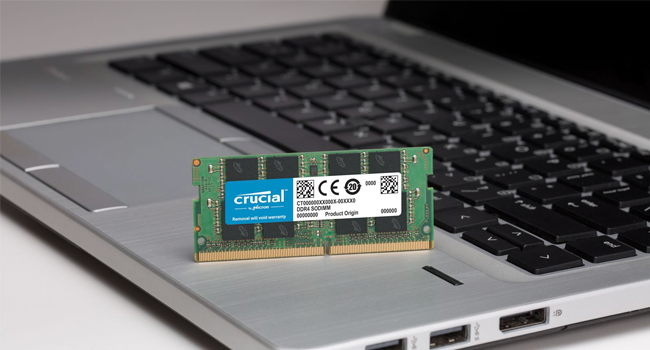
The Crucial 32GB Kit (2x16GB) DDR4 PC4-21300 SODIMM offers high-performance 2666 MHz memory in a compact 260-pin form factor, designed to supercharge laptops and small form-factor PCs with efficient 1.2V operation and trusted Crucial reliability.







| RAM | 32 GB DRAM |
| Memory Speed | 2666 MHz |
| Brand | Crucial |
| Series | Crucial DDR4 2666 MT/s SODIMM |
| Item model number | CT2K16G4SFD8266 |
| Hardware Platform | PC |
| Item Weight | 0.32 ounces |
| Product Dimensions | 2.7 x 0.43 x 1.1 inches |
| Item Dimensions LxWxH | 2.7 x 0.43 x 1.1 inches |
| Color | Multicolor |
| Number of Processors | 1 |
| Computer Memory Type | DDR4 SDRAM |
| Flash Memory Size | 32 |
| Voltage | 1.2 Volts (DC) |
| Manufacturer | Crucial Technology |
| ASIN | B071H38422 |
| Is Discontinued By Manufacturer | No |
| Date First Available | September 7, 2017 |
A**N
Easy Upgrade For 2018 Mac Mini
Okay. So this just came today, and I installed it in about 30 minutes while watching the 9to5mac upgrade video and being extra careful. Everything was honestly very straight-forward and fairly easy for anyone who is comfortable with tools in their hand. The screws are, of course, small, and can take a steady hand. I highly recommend a magnetic driver for this. Also, I haven't read this anywhere yet, but I noticed that there was blue Loctite on almost every screw I removed, so I added a drop to each one of those screws before replacing. This may not be necessary, but Loctite is cheap, so why risk it? Blue Loctite is made hold things in place, yet still be removable. Once you remove a screw however, it should always be re-applied. Just because you can still see it on the screw, doesn't mean it's still going to hold. It's also very useful on anything else you may assemble that vibrates, moves, or bears weight. Basically any screw that you think has a chance of backing out over time. I personally don't want one of those tiny screws on my expensive Mac falling out internally and damaging/destroying electronics, so I'm surprised this isn't suggested ion any of the upgrade videos/articles I've looked at. I struggled the most with plugging the antenna cable back in (fingers too big?), but got it to go after a handful of attempts. I also used an iFixit tool kit that I purchased here on Amazon. https://smile.amazon.com/iFixit-IF145-299-4-Driver-Bit-64pc/dp/B0189YWOIO/ref=sr_1_5?crid=385H6QIPQLVSQ&keywords=ifixit+essential+electronics+tool+kit&qid=1561248330&s=gateway&sprefix=fixit%2Caps%2C150&sr=8-5 This is a very solid tool kit that I will get a lot of use from. Highly recommended. This RAM was accepted instantly by my Mini and has made this thing blazing-fast. In summary, for about 30 minutes of your time and $130, you get $600 worth of factory speed on your new computer. If your clumsy, rich, or both - just pay Apple when you build your Mac. If you have a basic ability with tools, and a steady hand - this is a no-brainer. I'll definitely update this review if I see any problems with my computer going forward, but as of now, 5 stars.
L**.
No worries with Crucial RAM. It just works!
I never have any issues with standard Crucial RAM, and it's my go to choice when upgrading a laptop or advising clients who are upgrading their systems. No frills or RGB lights, just consistent performance and reliability at a decent price. Given that RAM is one of the most important components to consider when building or upgrading a system, I steer clear of less expensive options from other companies. Crucial is a consumer / SMB brand of the company Micron, the world leader in memory manufacturing.
J**C
Works at 2666 MHz in Acer Predator 2019
2 things: Great product and great customer service. Opening the up and installing them in my laptop was a breeze, and I ended up ordering the day before a pretty good sale, so they allowed me to later return the original for a refund with no hassle. However, Crucial might have missed quite a few sales because their website doesn't show the 1660ti 2019 Predator as compatible (and everyone with a predator upgrades their stuff because they are made to be easily modded). Officially, for some reason Acer listed a max of 2333 MHz, but the 2019 Acer Predator US version can use this at the full 2666 (I checked and that's what windows shows it is operating at). It feels pretty awesome to have a metric ton of things open and check to realize you still have over 20 gigs of ram left. If you've got a laptop and it says it is capped lower then you might want to check forums, bc this may very well be perfect for you but not show your model as compatible. If you've got the predator I mentioned earlier: GET THIS ONE RIGHT HERE! I agonized over what to pick, and here we are over 2 months later and I know for sure I made the right choice.
R**.
Perfect for 2018 Mac Mini
The Ram sticks came earlier than expected and install was honestly pretty easy. Definitely buy this with the iFixit essentials kit if you plan on doing a Mac Mini upgrade and don't have the tools to do it. It's literally just another 20 dollars. Bumping this machine up from 8 gb of ram to 32 gb of Ram makes a huge difference in performance. Tasks are a lot smoother with the 32 gb of ram. On thing to note though, is that the 2018 Mac Mini will still have below average graphic performance even with this Ram upgrade, so if you want to really take it to high gear, you should look into buying an affordable external GPU. If you want the best graphics performance with some additional USB ports, either buy one of the Black Magic eGPU's or buy the Razor Chroma eGPU. But, if you want something that is more lightweight and portable with slightly above average graphics, I would recommend the Sonnet Breakaway Puck 560 or 570 models. The 560 is conviently is available on the Apple website, the 570 you'd have to buy on the Sonnet website.
T**I
I bought 32GB 2666MHz and got 16GB 2400MHz! Update: I got the right product.
The product works, but I have to go over the process of removing the new ram, installing the old one back, waiting for the return, and all that. The installation is easy and the (wrong) product was packed well. There was a problem with the labels as you can see in the first picture. Update: I got the right product after requesting for a return. Amazon delivery was efficient and I had the right product 2x16GB 2666MHz after two days. A little inconvenient, but not the worst. It is working just fine and the system had no problems identifying the RAM. If you are installing the RAM on a Mac mini 2018, make sure that the RAM is firm and secured in place, and that the little metal holder aligns with the small holes on the RAM.
D**E
Helped a lot for video editing with DaVinci Resolve
I have a Dell XPS 9570 with 500gb storage and 16gb of RAM. I often film in 4k 30fps. Whenever I was editing with DaVinci Resolve my timeline would stutter and I've been dealing with it for years. I just dropped this new ram in today and I wish I did it forever ago. No more timeline stuttering. It works awesome and it will save me tons of time during the editing process. So ya, if you have the same setup as I do and want a better computer experience overall. Get this ram. Now I'm deciding if I want to get 1tb of Samsung SSD.
ゆ**う
iMacの増設用に購入しました。 動画サイトを見ながら取り付けましたが、初めてでも問題なくできました。 それから2〜3年使っていますが、特に問題なく使えています。
R**A
it works well, easy installation
J**.
If you're about to buy a 27inch 2019 iMac, spec the basic RAM and then buy this kit. It's much cheaper than Apple's extortionate prices. You can run your machine as 40gb RAM or sell on your old RAM for about £25 to offset the price of this pair. Installation couldn't be easier - a complete novice can do it in a few minutes. 6 months on, everything is running perfectly and very, very swiftly.
A**E
I really appreciate the call before shipping to confirm and send the right product. It works on my imac seamlessly. However if anyone is hoping it would speed up loading and processing time then you might be disappointed a bit. However it does make sure the job gets done when processing videos. Overall I would say invest in it if you have the budget and do it 2 slots at a time.
J**L
Ich hab 2 mal RAM gekauft von Crucial Mein Windows Laptop Mein Laptop ist nicht der Neuste, und hatte nur 4GB RAM, sehr wenig für heutige begriffe. Ich wollte mich keinen Neuen kaufen. Also habe ich mich 32GB RAM zugelegt. Das tut aber Gut. Die alten Riegel raus und die Neue rein. Neu gestartet und lauft schneller, macht weniger Lüfterlärm und hab gleichzeitige mehrere Programme auf die super zusammenarbeiten. Kann es jeder Empfehlen mindestens 16, besser noch 32 GB in ein Laptop zu Stecken! Auf meinen iMac Dieses Ram Heb ich gekauft um meinen iMact von 72GB auf 128 GB zu Upgraden Ich hatte letztes jahr die spendierhose angezogen und es war i9 geworden, 500GB ssd, 8GB RAM mit einer eigenen Nachrüstung von 64GB (also 72GB) und die Vega 48. Das Einbauen ist kinderleicht. Schalte dein mac aus, lege ihm mit dem Bildschirm auf eine dicke Decke. Ziehe den Stecker und da wo der Stecker war ist ein kleiner Knopf. Dieser drückt man. Die klappe da drüber geht auf und da seht man die Module. Ziehe den kleinen Hebel daneben vorsichtig hoch und platziere den RAM Riegel vorsichtig an die Lehre stellen. Achte drauf das die richtig reingesteckt werden. Der kleine schlitz im RAM Riegel Zeicht es. Wenn die drin sind druck den Hebel wieder runter und schließe die Klappe. Den habe ich extra nur mit 8 GB gekauft. Hab dann 2-mal 32GB Speicher bestellt und da einen iMac mit 72 GB. Alter Config ----------———---—---- (32GB) ================== (4 GB) ———---------------—-- (32GB) ================== (4 GB) Da die Speicherpreise so niedrig sind wie noch nie habe ich die 2 mal 4 rausgenommen und noch mal 2 32 GB Riegel reingesteckt. Neuer Config ----------———---—---- (32GB) ----------———---—---- (32GB) ———---------------—-- (32GB) ----------———---—---- (32GB) Da ist tatsächlich das RAM 5,6% schneller.
Trustpilot
2 weeks ago
3 days ago