
DOWNLOAD THE APP


Customer Services
Copyright © 2025 Desertcart Holdings Limited
DOWNLOAD THE APP

🚀 Compact power, limitless storage, and pro-grade remote control — own your NAS game!
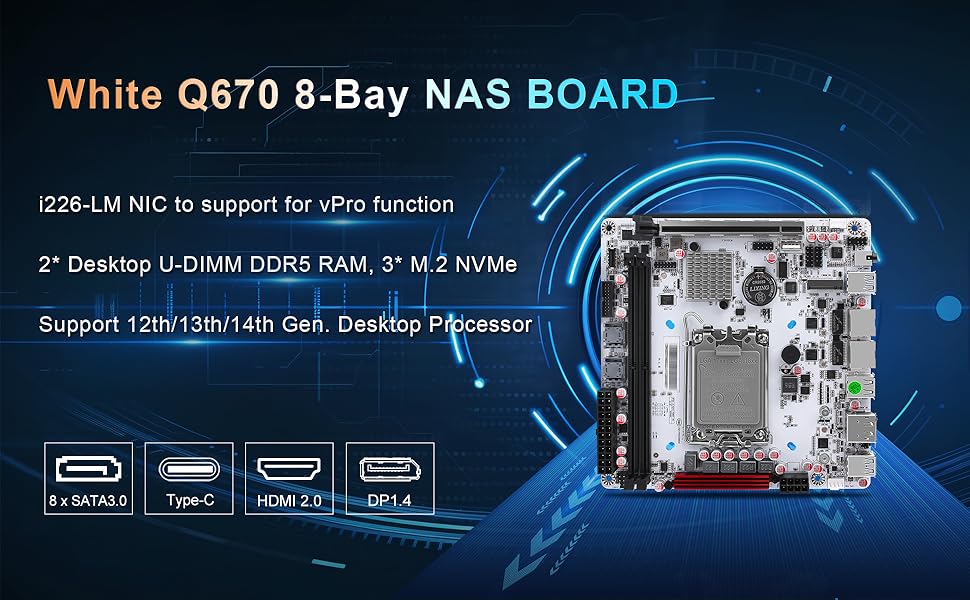
The StoneStorm Q670 8-Bay NAS Mini ITX Motherboard is a compact yet powerful platform designed for 12th to 14th Gen Intel desktop processors. It supports up to 64GB DDR5 RAM, features three PCIe4.0 M.2 NVMe slots alongside 8 SATA ports for extensive storage options, and offers dual 2.5GbE LAN ports with vPro for advanced remote management. Dual 4K display outputs and a PCIe5.0 x16 expansion slot make it ideal for professional NAS builds and compact workstations.



| ASIN | B0DP9JMD2Q |
| Batteries | 1 CR2032 batteries required. |
| Best Sellers Rank | #640 in Computer Motherboards |
| Customer Reviews | 3.9 3.9 out of 5 stars (42) |
| Date First Available | November 27, 2024 |
| Item Weight | 1.32 pounds |
| Item model number | CW-L02-NMQ670PLUS |
| Manufacturer | ChangNet Networks Inc. |
| Product Dimensions | 6.7 x 6.7 x 1 inches |
D**A
Good Nas motherboard
I purchased this motherboard for a new home built NAS in 2025. I have had the unit and installed the OS (Unraid OS) for a few weeks now with a Intel Core i5 (12th Gen) i5-12500 CPU. At this time I have no complaints for the motherboard. All the components I purchased for the NAS seem to work without any issues. I purchased Crucial RAM 64GB Kit (2x32GB) DDR5 4800MHz CL40 Desktop Memory CT2K32G48C40U5 as the vendor recommended Crucial as a supported/tested RAM vendor. The board seems to be of good quality. I put the motherboard inside a Jonsbo N3 case which supports up to 8 HDDs. I was able to connect the 2 SFF-8643 cables with no major issues to the Jonsbo SATA backplane and the BIOS sees all the SATA ports correctly. At this time I'm only using 3 of the HDD bays/ports actively. I also installed 2 NVME drives (2x of Crucial P3 Plus 2TB PCIe Gen4 3D NAND NVMe M.2 SSD, up to 5000MB/s - CT2000P3PSSD8) into the 3 slots of the motherboard, 1 near the CPU on the top and 1 on the underside of the motherboard. I would caution these can be tight spaces. I put 2 low profile NVME heatsinks on the SSDs before mounting them and the NVME slot next to the CPU is a VERY tight fit. Also, as I mentioned I used 2 of the 3 NVME slots, the last remaining slot on the underside of the motherboard is I think out-of-reach when the motherboard is fully installed in the Jonsbo N3 case ... so if I want to install a 3rd NVME drive I would have to dissamble everything to easily reach that location on the motherboard; there is simply to way to reach it with all the sata cables and the N3 fully assembled and hooked up. I was able to setup WOL with Support of the Vendor. I have not tried using the i226-LM 2.5G vPro remote access port at all yet (this is for my home office). The vendor was very helpful the few inquiries I sent them, and they did send a PDF manual (pretty simple and bare manual) when I purchased the mobo initially. I have also purchased a Sparkle A310 Intel Arc GPU card and I had no trouble disabling the onboard GPU in favor of the PCIE GPU card and the Arc card has had no issues with the mobo that I can tell. 1 issue I did encounter with the motherboard was the RAM sticks had to be pushed _very_ hard into the motherboard or the system would not POST and emitted some beeps. They have a video showing how the system should POST typically -- it would be nice if they explained if there are any significant error beep codes to be aware of. I think I heard a repeating beep once, and another time a shorter sequence of beeps. I believe the long beep sequence was neither RAM stick being seen, and the shorter sequence may have been 1 RAM stick not fully seated. I had try 5 or 6 times to reseat the RAM, and once it did post with 1 stick of RAM ... so eventually I just figured out, push in the RAM sticks very very hard and then the POST will work. In general I am very pleased with the motherboard itself and as mentioned the vendor was very receptive to inquiries.
E**R
Great Little NAS Motherboard, Documentation Absent
The Good Part: Function-packed mITX motherboard, working well as the heart of my new Rockstor NAS. Compact CPU cooler (Noctua NH-L9x65) fit in nicely without colliding with RAM or blocking any connections on the Motherboard. Enough SATA connections to drive all 8 mass storage drives, plus three M.2 slots for the OS and container storage. In the latter's case, you'll want to make sure you've installed the two M.2 drives fitted to the back BEFORE completing assembly, as installing them later would be a pain. The Not-So-Good Part: Arrived naked in a box with no manual. Mounting plate and screws included. Managed to find a manual online for a similar compact motherboard and cribbed from that. 8-pin front panel connector matched up with standard 9-pin connection with the connector overhanging, and the status lights on the case work (power, drive activity, etc.) but took some finangling to figure out the pin-outs and confirm that plugging in the case FPANEL connector (Jonsbo N3) wouldn't blow up the entire motherboard. Overall Rating: Five stars, as it (quite literally) filled the square and performance is more than acceptable. If you've done your own builds for a while, this board is easy to install and configure.
D**O
Worst QA that you can ever imagine.
I write this review as I sit on my second board contemplating my options. This is, without a doubt, the most frustrating piece of hardware I have encountered in a long time. Let's start with the fact that the supplier does not provide a manual... they provide a link to a mega download written on a picture... that you have to painstakingly type letter by letter. The manual welcomes you with a warning: If there is no signal of life, do not return, contact us, we have a tech deparment! That should give everyone pause. First board: Dead on Arrival. Tried with two power supplies, does not even boot. The CPU does not receive any power. Tried a i5-13500, nope, i3-13100T nope, i5-14500T nope again. Maybe is the memory? DDR4? nope, DDR5 nope. processed the return. Second board: plug in the 13100T, miracle, it powers up. Strange it does not emit any sounds, change the memory? nope, change the power supply, nope again. Ok let's follow the manual. remove the memory sticks, no, no sound. reset the battery, nope. Ok let's try with a different CPU, i5-13500, and miracle, after several power cycles it seems to calibrate the memory and we get finally a beep. Got into the bios, and power itself off, and now... it does not beep again. So I'll probably need to return this one as well. I hope it didnt burn any of my CPUs or memory. Stay away. EDIT: I Processed the return, but still fighting with this board, if not for anything, to leave written report of what it takes to get this piece of 'bodily waste' working. Seller offered a 'full refund': no señor, this does not go away. everyone deserves to know. I managed to get the i5-13100 working here, dunno about other CPUs because I am scared of farting to close of this thing in case it explodes. Big issue with this board is that the PCIE x16 board and one of the UDIMM slots have an incompatibility that gets the system stuck trying to post. This issue seems, at least mitigated with a BIOS update, but you have to get there. So when you get this board, prepare a USB stick and burn into it the following ISO https://shorturl.at/3RaIp Don't plug anything on any of the PCIe buses or M2 slots. Plug your memory sticks, plug your USB stick, remove the BIOS battery and boot the system. If you don't see two green leds, the board is dead... NEXT. If you see two green lights, sit leisurely with a tea. The board is now trying to calibrate the memory, it can take up 5-10 minutes until it restarts several times and you get a beep. If you don't get a beep, change the memory, remove one of the stick etc. If it does not been, send this board to the manufacturer. If you get a beep, and you flashed the USB stick properly, the BIOS will update. Do not touch it until it finishes. When it finishes, then feel free to put the rest of your stuff. You may be on the clear. Now, if you plan to plug anything on the PCI slot, you need to disable SMBUS. You need to tape (yes tape) a few pins of the PCIE bus. (https://www.virtualizationhowto.com/wp-content/uploads/2024/06/Using-tape-to-cover-pins.png) If you don't, half the memory will be gone, or you wont to be able to boot the system. I will date to change the CPU tonight, hopefully it still works. ---- Don't buy this board unless you are ok with this procedure
M**D
I was hunting for a mini ITX motherboard with a minimum of 6 SATA ports to build a system for Media Server, Home Automation and Backups. The choices were very few. I came across this N305 Purple Motherboard that checked most the boxes. (more on that later) From the onset I ran into a few issues as the BIOS was out of date and the drivers were not available to enable the 2.5G Ethernet as they were not recognized by Windows 10/11. After contacting the company (who have excellent customer service) they provided me with a temporary link for both including a short User’s Guide. I recommend that they include information in the box that contains a permanent link to these items and expand their manual to cover the unique functions that this board offers. I also wanted to add a PCI-E card to extend the number of SATA Ports, but the slot was also required in order to add WIFI 7 and BT 5.4. However the Bluetooth requires power from USB and there are no 9 pin USB connectors on the motherboard. I found a 9 pin to USB A adapter on Amazon and plugged it into one of the 2 USB slots that were on the motherboard and everything worked perfectly without adding any drivers. As to the extra SATA slots, I found (again on Amazon) a card that fits into one of the M2 slots that allows for an extra 6 SATA ports (no drivers required). Now I have a Mini ITX that has 12 SATA ports WIFI 7, BT 5.4 and will handle my requirements. So if you are looking good motherboard, take a look at the N305 Purple Motherboard.
Trustpilot
1 month ago
5 days ago