Desert Online General Trading LLC
Dubai, United Arab Emirates
Desert Online General Trading LLC
Dubai, United Arab Emirates


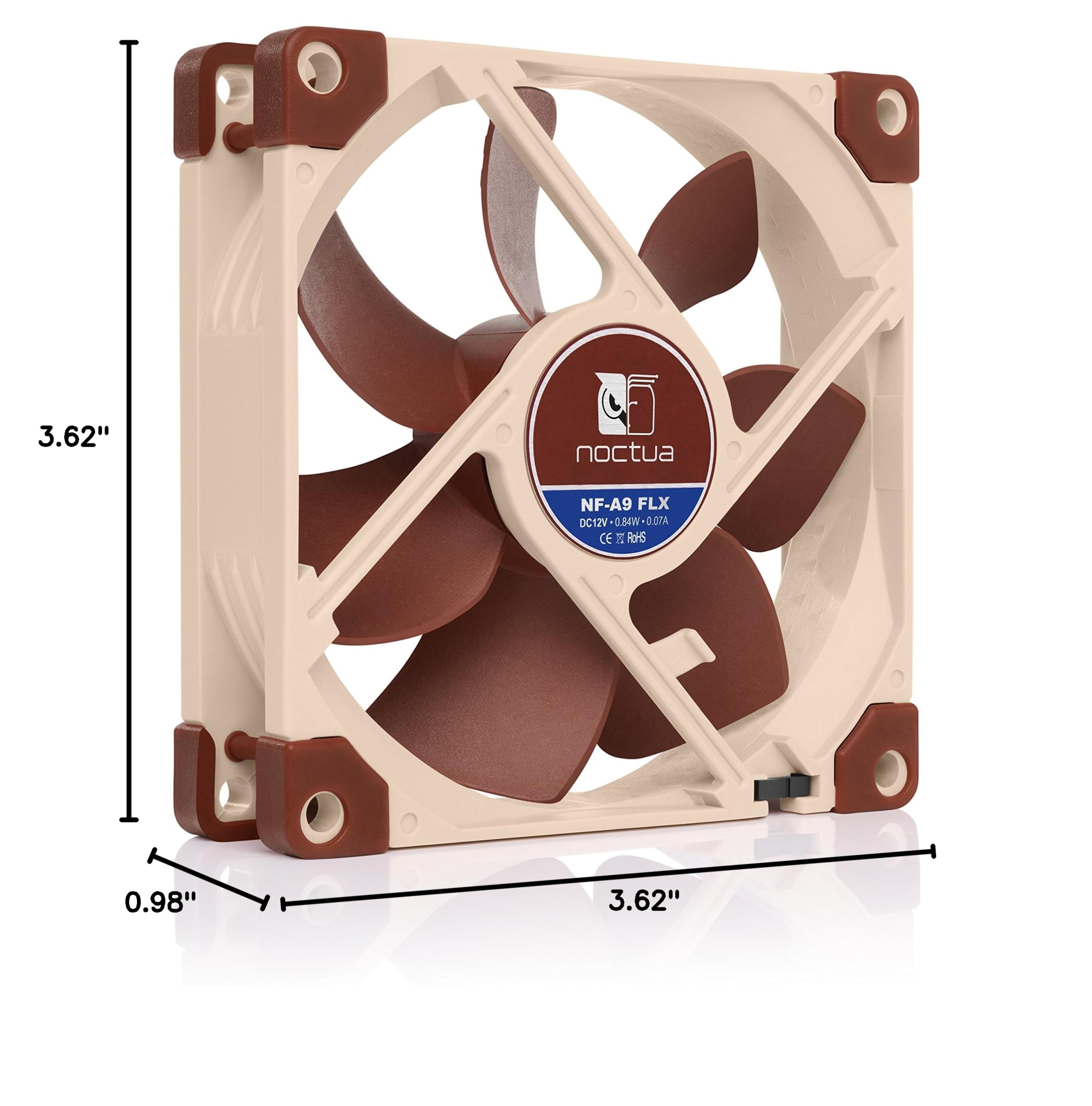


🌟 Elevate Your Cooling Game with Noctua's Premium Fan!
The Noctua NF-A9 FLX is a premium 92mm quiet fan designed for superior cooling performance. With customizable speed settings and a noise level of just 17.1 dB(A), it’s perfect for compact PC builds and CPU coolers. Built to last over 150,000 hours, this fan comes with an installation kit for easy setup.


| Product Dimensions | 0.98"L x 3.62"W x 3.62"H |
| Brand | Noctua |
| Power Connector Type | 3-Pin |
| Voltage | 12 Volts |
| Cooling Method | Air |
| Compatible Devices | Desktop |
| Noise Level | 17.1 dB |
| Material | Fibre-glass reinforced PBT |
| Maximum Rotational Speed | 1600 RPM |
| Air Flow Capacity | 30.07 Cubic Feet Per Minute |
| UPC | 842431014474 |
| Global Trade Identification Number | 05057103140367 |
| Manufacturer | Noctua |
| Number of Items | 1 |
| Item model number | NF-A9FLX |
| Item Weight | 8.1 ounces |
| Item Dimensions LxWxH | 10 x 2 x 2.7 inches |
| Color | Brown |
| Computer Memory Type | DIMM |
| ASIN | B00NEMG9B0 |
| Is Discontinued By Manufacturer | No |
| Date First Available | September 17, 2014 |
T**S
Excellent fan with low noise and great air movement
I bought these for my Synology 916+ NAS. I first bought the other model SS02 by accident and realized it was 4 pin but the Synology NAS is only 3 pin. Returned those and got this one instead which fit perfect. I am running 4 Ironwolf 10TB hard drives in my NAS so definitely want to make sure these puppies are cool. The old fans were loud and just not moving air as well. Sure these fans are expensive for 92mm fans but if you just spend $1200+ on your NAS, keeping your drives cool as possible is your main priority. It's like buying a luxury car and filling it up with cheap gas. No, sorry. But I am super pleased with the FLX fans. Really easy to install them and they came with a ton of extra cables that I will probably never use. Probably the best packaging in a fan you can imagine. But when you are paying premium prices it's what you should expect. Now that I have them in my NAS, the hard drives are 2 degrees cooler. It may just be that the old ones were pretty dusty (see my pics) and the new fans are just moving air nicely. Overall, I would highly recommend this fan as it is super quiet but moves a lot of air. Not the cheapest but you are definitely getting a quality product here.
T**N
Exceeds expectations. Premium Product at Fair Price. Excellent Value.
More quiet than a whisper. Light weight, yet rugged and study. Premium materials. Exceptional manufacturing. Well made. Very high-end packaging. A premium product at a very fair price. Comes with everything you need to install. Absolutely worth a few more dollars than the cheaper fans. It performs better in every way I can think of. Fit well, as described. Cables are of high quality, and latch well. Color did not matter to me. They look just like they do in the photos. I have bought three more, to replace old and loud fans in other equipment. I will be a customer of this company for as long as their product quality remains at this very high level. Thank you for exceeding expectations.
A**R
Almost TOO Quiet!
Bought to replace a failed fan in a 3D printer. When I booted the printer up with the new fan I thought I'd wired it wrong, there was NO noise. But then I noticed the faintest whoosh and a breeze coming from the vent port. The fan ABSOLUTELY delivers on the promise to move a lot of air with no noise. I never had to touch the low-noise adapters; I can only assume you use those if you're on a submarine trying to avoid detection!
J**O
Works great in my OWC ThunderBay 4 drive dock
I recently purchased a OWC ThunderBay 4 drive dock. I thought its fan was a little noisy, so I replaced it with this Noctua fan. Now it's nice and quiet. I like it!This fan comes with some low-noise adapters that slow down the fan. I'm using the one that reduces the fan speed to 1050 RPMs, and it works great with my drive dock.
M**T
Noctua is the BEST
So I used this fan to replace a non PWM 4pin fan system-cooling (front intake) that allegedly pushed more rpm than this Noctua but, well, now the PWM is controllable AND somehow, this fan is giving me an extra 3-5 degrees of cooling compared to the replaced 4 pin fan (not a Noctua, obviously). Yay.The fan comes with not one but two low noise adapters AND a 3 to 4/3 pin y-splitter that I can confirm will make the PWM of this fan accessible (don't use two connections on a y splittet unless it's directly in an overhead). Heck, while idling in MSI afterburner I noticed my auto fan percentage went down because even on low RPM, this fan is doing more work.Last, my two favorite things about Noctua fans are the silence and LACK of rgb. 10/10 no nonsense fan that could legit be installed in everything from a prebuilt to a home build. Buy Noctua fans: they sound like heaven and not a maelstrom of noise.
B**N
Quality fans, good airflow, low noise
I got these fans for my retro gaming rig and found out the old motherboard doesn't really control the fan speed - it has them running at 100% all the time. I wanted to build a fan controller circuit from scratch, but then I found out Noctua had actually included low noise and ultra low noise adapters - I had mistaken those for short extension cables. Silly mistake, I know.Now my rig has decent airflow, and it no longer sounds like a jet engine during takeoff. It's whisper-quiet.Everything - the packaging, included accessories, the quality of the fans themselves - makes these fans worth the price.
A**6
Minimal Improvement
I replaced my stock fan on a Synology NAS DS912 with this Noctua fan but haven't noticed a huge difference. It's a decent fan, but the improvement in noise reduction and performance wasn't as significant as I expected. but a solid fan tho.
V**Y
Industry gold standard, works great.
Noctua is the most expensive fan, and well worth it. Look, the difference between a budget fan and a great fan is $10, so just do it.Comes with everything you need to complete the installation: adapters, screws, etc.Comes in packaging suitable for Tiffany's.Very quiet. The only small issue I had was I had difficulty getting the provided screws to bite into the plastic so I just used the screws from the old fan.General information: Make certain you get the size right. This client's computer, a 7-year-old HP Envy, uses a 92mm case fan. I almost ordered the standard 80mm til I measured the existing one.Even though it comes with header adapters, it's best to order the correct one (3 pin, 4 pin) suited for your motherboard. I'd read about instances of users getting a "system fan not installed" error, but not with the Noctua.Also, determine the direction of air flow before removing the old fan.Take a minute to order the correct one and you'll be happy with the results.
Trustpilot
1 month ago
2 weeks ago
3 weeks ago
3 weeks ago