Desert Online General Trading LLC
Dubai, United Arab Emirates
Desert Online General Trading LLC
Dubai, United Arab Emirates

🚀 Upgrade your speed, shrink your footprint, own the future.
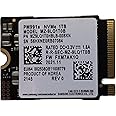
The Samsung PM991a 1TB M.2 2230 NVMe PCIe Gen3 x4 SSD delivers ultra-fast sequential read/write speeds up to 3100/2000 MB/s and random IOPS up to 380K/330K. Its compact 22x30mm form factor fits a wide range of laptops, ultrabooks, tablets, and gaming devices, providing consistent high performance with Full Power Mode. Ideal for professionals and gamers seeking reliable, high-capacity internal storage.
| Hard Drive | 1 TB Solid State Drive |
| Brand | Samsung |
| Series | Samsung PM991a Series |
| Item model number | MZ9LQ1T0HBLB |
| Item Weight | 0.634 ounces |
| Product Dimensions | 0.87 x 0.87 x 0.09 inches |
| Item Dimensions LxWxH | 0.87 x 0.87 x 0.09 inches |
| Color | Black |
| Flash Memory Size | 1 TB |
| Hard Drive Interface | Solid State |
| Manufacturer | SAMSUNG |
| ASIN | B0BGYLVLJD |
| Date First Available | September 30, 2022 |
P**U
Surface pro 8
I recently installed this 1TB ssd in my surface pro 8. Works great! Been using for couple weeks now without issue. Much more responsive then the OEM 256GB ssd. Driver package can be downloaded from microsoft. Tablet is picky what drives can be used since circuitry can not handle extra power draw from other brands.
S**D
Works well if you need a gen 3 SSD
There are definitely cheaper options, and faster, but if you're limited to using gen 3 PCIE (Like with my surface pro 7+) then this works well. 1TB is a great upgrade for something like a surface where portability is king.Remember many surface pros will NOT play well with gen 4 SSD. I could install but would get random crashes. Gen 3 is good to go there.
S**Z
Excellent. Don't buy anything else.
Bought to upgrade storage of my Surface Pro 7 5G. Don't buy anything else..
W**
works great for the Surface Pro 8
If you need to ugrade the stotage on your Surface Pro this is the way to go!
R**D
Appears to be the correct SSD.
Appears to be the correct SSD, but I haven't had a chance to use it because the external case I purchased is defective.
Z**X
I'm not sure if it's a Samsung product
It works well but it is not recognized by my Samsung Magician software.
G**M
Samsung Magician was not able to prove drive was authentic.
After installing windows 11 and connecting the drive to my laptop, Samsung Magician was not able to authenticate the SSD. I tried new drivers, I tried to reinstall the Magician software, to no avail. According to Samsung customer support, any Samsung drive should have no issues displaying authenticity confirmation.
A**C
Perfect for Adding Space to an Older Laptop!
I bought a Gateway gaming laptop back in 2007 that is still a decent performer today, but I have taken its 2-SATA RAID as far as it can go, so it was time to add an internal SSD, since there was an unused micro PCIe slot next to the processor heatsink.Using a micro PCIe adapter, this Samsung SSD was a perfect option! Just be absolutely certain you get an adapter that is correctly keyed for the SSD!It works for storage in Windows 10; the only drawback is that the BIOS is too old to allow it to be a boot drive. It is perfect otherwise, though!
Trustpilot
3 days ago
3 weeks ago
2 months ago
2 weeks ago